Best WooCommerce Alternatives (2026): Why Modern Brands Are Leaving WordPress for 0% Fee Unified Commerce
The definitive, unvarnished comparison of the best WooCommerce alternatives in 2026. Discover the hidden total cost of ownership (TCO) of 'free' open-source plugins, why database bloat slows mobile stores, and how moving to a zero-fee unified commerce OS saves retailers $7,000+ per year.
While WooCommerce software is open-source and free, running a high-performing store requires hosting ($600–$2,400/yr), 25–40 paid plugins ($1,500–$3,500/yr), security monitoring ($300/yr), and ongoing developer bug fixing ($3,000+/yr), resulting in an actual Total Cost of Ownership (TCO) of $7,000 to $14,000+ annually.
The monolithic PHP/MySQL architecture of WordPress stores product and order metadata in wp_postmeta, causing severe database query bottlenecks, high server response times (2,500ms+ TTFB), and failed Google Core Web Vitals at scale.
AddQart delivers a modern, fully managed cloud commerce OS built on Next.js Turbopack and high-speed edge microservices (sub-200ms edge speeds) with zero plugin dependencies, 0% platform transaction fees, and free built-in Cloud POS.
Unlike WooCommerce, which requires fragile third-party extensions for bilingual RTL (WPML) and regional payment rails, AddQart includes native Arabic/English parity and direct domestic debit rails (Qatar NAPS, Saudi MADA, Kuwait KNET, Bahrain BenefitPay, Bangladesh bKash).
Merchants can migrate an entire WooCommerce store—including product catalogs, variable SKUs, customer databases, and historical orders—in under 5 minutes using AddQart's automated 1-click importer with zero downtime.
Executive Summary: WooCommerce was built in 2011 as a blogging plugin add-on. In 2026, modern omnichannel retail demands sub-second edge speeds, native physical Cloud POS integration, direct national debit rails (NAPS, MADA, KNET), and zero plugin maintenance debt. AddQart provides an enterprise managed alternative that eliminates hosting overhead, eradicates third-party plugin vulnerability risks, and preserves $7,000 to $15,000 in net profit every year via a 0% platform fee structure.
1. The State of WooCommerce in 2026: The Decline of the Plugin Monolith
When WooCommerce launched in 2011, it revolutionized online retail by democratizing e-commerce. For the first time, anyone with a cheap WordPress blog could download a free plugin and start selling t-shirts or digital downloads.
In 2026, the retail world has completely outgrown this architecture.
Today's e-commerce is no longer about hosting an isolated digital catalog on a shared Apache server. Retailers now demand:
Sub-500ms global edge delivery on mobile devices to pass Google Core Web Vitals.
Unified real-time inventory synchronized across online storefronts, TikTok/Instagram, WhatsApp conversational commerce, and in-store cash registers.
Zero maintenance overhead, eliminating constant plugin update breakage, PHP version incompatibilities, and database optimization scripts.
Enterprise security compliance without having to manage firewalls, SSH keys, or malware patches manually.
WooCommerce was built on a 20-year-old blogging engine designed for text posts, not real-time concurrent transactional commerce. As a result, fast-growing brands reach an unavoidable threshold where WooCommerce stops being an asset and becomes a severe operational and financial bottleneck.
2. The 'Free' Illusion: Uncovering the True Total Cost of Ownership (TCO)
The number one reason entrepreneurs choose WooCommerce is the word "FREE". The core plugin costs $0 on the WordPress repository.
However, running a real commercial business on WooCommerce is among the most expensive e-commerce setups in the world.
To turn basic WooCommerce into a viable, secure, and modern online store, merchants are forced to assemble a fragile patchwork of paid subscriptions:
When merchants calculate their actual credit card statements, "free" WooCommerce costs between $400 and $1,000+ per month in pure software and IT maintenance.
AddQart eliminates this entire financial drain. You pay a transparent, predictable subscription with 0% platform transaction fees and zero paid plugin dependencies.
3. Architectural Face-Off: Modern Next.js Edge Cloud vs. Monolithic PHP/MySQL Bloat
Why does a WooCommerce store with 5,000 products and 10,000 orders crawl at a snail's pace, while modern platforms load in the blink of an eye?
In WordPress, every piece of product data (SKU, price, stock status, weight, dimensions, sale price, color variant) is stored as a separate row in the wp_postmeta database table.
If you have 1,000 products with 5 attributes each, your database table ballooned to over 50,000 rows. When a shopper filters by "Size: L" and "Color: Black", MySQL must execute complex, unindexed multi-table JOINs across tens of thousands of rows.
During a flash sale with 200 concurrent visitors, the MySQL database locks up, server CPU reaches 100%, and checkouts timeout with a 504 Gateway Error.
The Modern Cloud Architecture of AddQart
AddQart was architected from day one for high-concurrency retail:
High-Performance Cloud Microservices: API requests execute in under 15 milliseconds.
Next.js Turbopack Edge Storefronts: Pages are pre-rendered at global CDN edge locations closest to your buyers, guaranteeing sub-500ms load speeds.
Zero Server Management: You never configure Nginx, patch PHP-FPM, or run MySQL repair scripts.
A standard WooCommerce store requires an alarming number of third-party plugins just to function:
1.Yoast SEO or RankMath (SEO tags)
2.WP Rocket or LiteSpeed Cache (Speed caching)
3.Wordfence or iThemes (Firewall)
4.WPML (Arabic/English translation)
5.WooCommerce Stripe Gateway (Credit cards)
6.WooCommerce PDF Invoices & Packing Slips
7.YITH WooCommerce Wishlist
8.Table Rate Shipping
9.UpdraftPlus (Backups)
10.PixelYourSite (Meta and TikTok tracking pixels)
...and 20 more.
The Update Anxiety Cycle
Every Tuesday, store owners dread logging into their WordPress admin panel. You see 12 pending plugin updates. If you click "Update All":
The payment gateway breaks because WooCommerce core changed an internal checkout hook.
The translation plugin conflicts with your theme, displaying Arabic text flipped or misaligned.
Your checkout page throws a critical fatal PHP error, halting sales for 6 hours until an agency developer fixes the syntax bug.
The Security Nightmare
Over 90% of all compromised websites on the internet run on WordPress. Why? Because every third-party plugin you install is written by an external developer with varying security standards.
When a plugin suffers a Cross-Site Scripting (XSS) or SQL Injection vulnerability (CVE), automated hacker bots exploit it within hours, injecting malicious JavaScript to steal customer credit card numbers directly from your checkout form.
On AddQart, all core commerce capabilities—from SEO and bilingual translation to payment gateways and shipping labels—are engineered directly into our secure platform core. Zero third-party plugin dependencies means zero third-party attack vectors.
To run a physical cash register on WooCommerce, merchants typically install third-party plugins like WooCommerce POS or Oliver POS ($199–$468/yr).
These plugins rely on your WordPress server to process in-store transactions.
If your mall Wi-Fi connection stutters, the cash register freezes.
Offline barcode scanning is slow and unreliable.
In-store sales and online orders frequently conflict, resulting in embarrassing out-of-stock cancellations when two shoppers buy the last item simultaneously.
The AddQart Enterprise Cloud POS Advantage
AddQart includes a full-featured, multi-location Cloud POS system completely free ($0) across all plans:
Hardware Agnostic: Runs instantly on any iPad, Android tablet, laptop, or Mac.
Bluetooth & ESC/POS Support: Connect wireless barcode scanners, thermal receipt printers, and automated cash drawers.
Offline-First Resilience: Continue scanning items, calculating taxes, and ringing up cash or card sales even if your internet connection drops. When reconnecting, transactions sync automatically.
Zero Inventory Desynchronization: Stock levels decrement instantly across physical cash registers, online storefronts, and mobile apps from a unified database.
6. Payment Rails in 220+ Countries: 22+ Native Gateways vs. Fragmented Modules
Accepting payments on WooCommerce is an exercise in administrative frustration.
To accept local payment methods in Qatar, Saudi Arabia, Kuwait, or Bangladesh, a WooCommerce merchant must purchase, install, and configure individual third-party gateway plugins—many of which are poorly maintained, cost $79 to $149 each, and fail during major WooCommerce core updates.
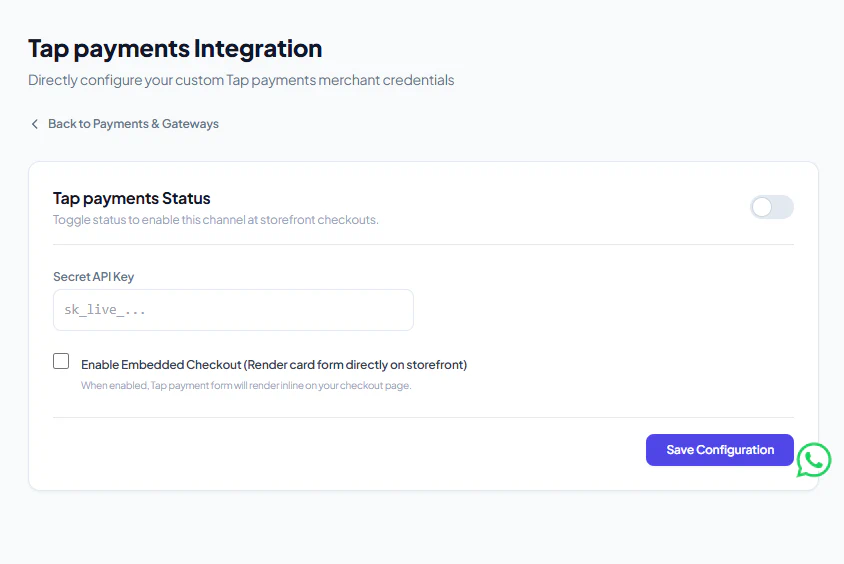
AddQart Payment Configuration — Secret API Key & Embedded Inline Checkout Toggle for GCC Merchants
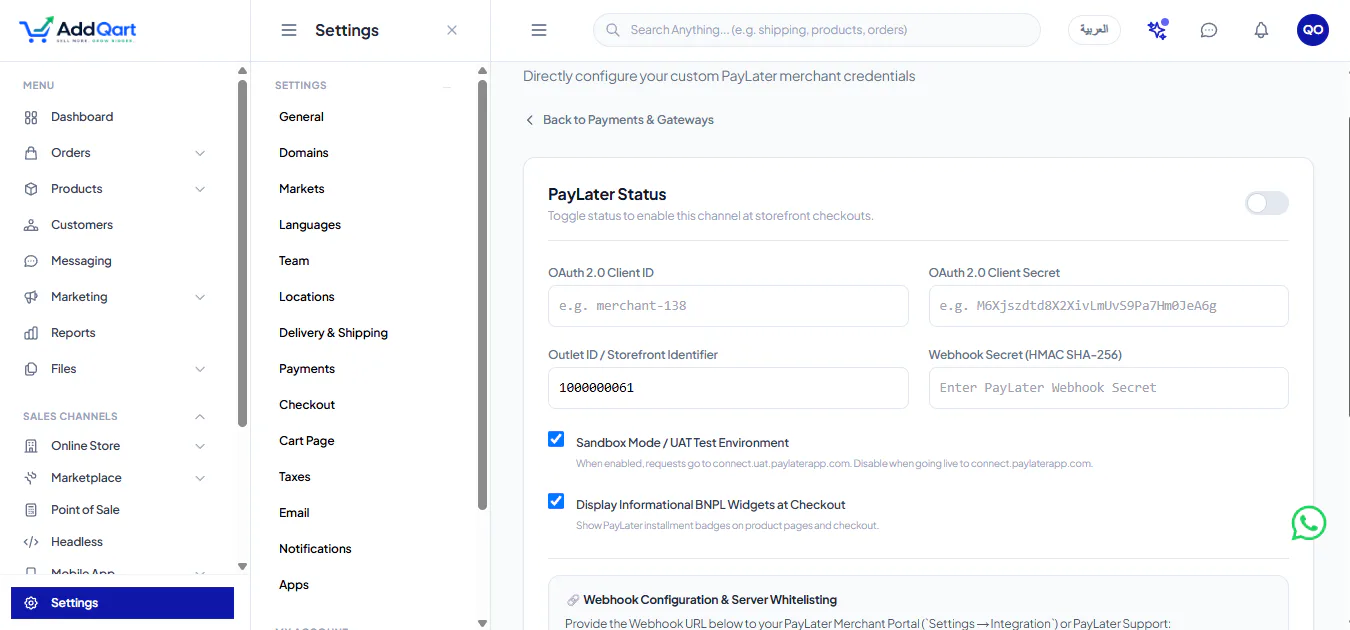
AddQart PayLater Integration — 4 Zero-Interest Installment Configuration to Boost Conversions by +40%
AddQart's Native Payment Infrastructure
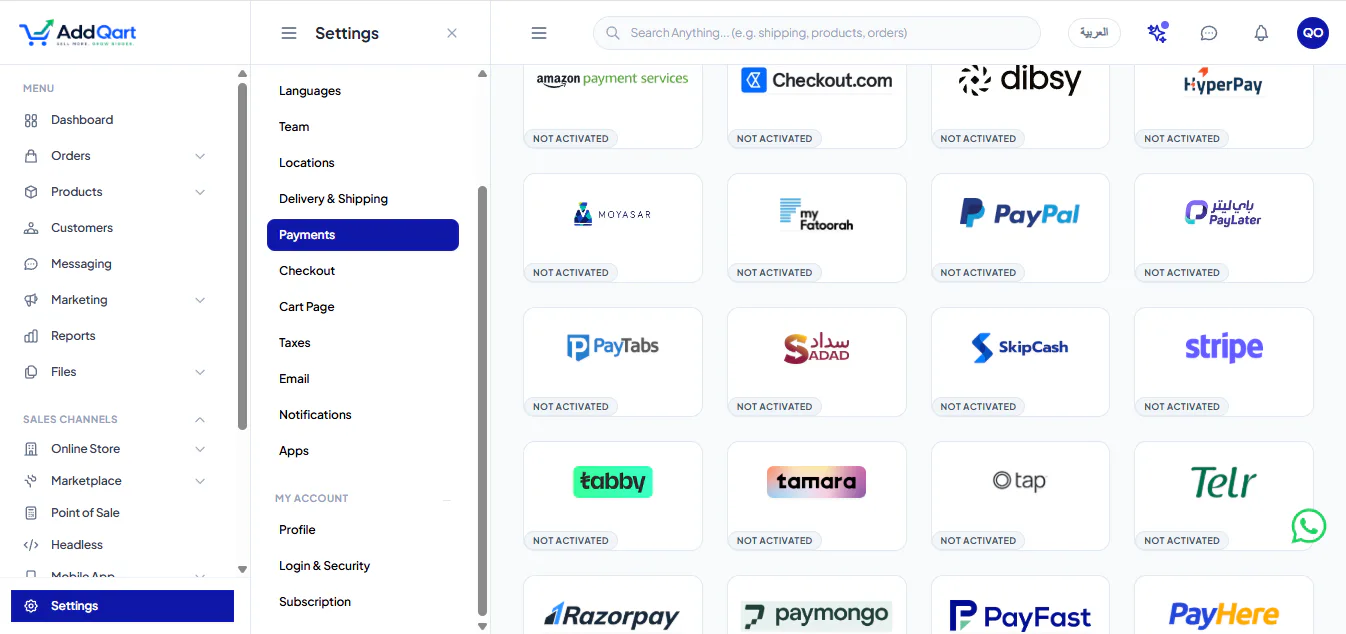
AddQart provides a unified 22+ payment gateway switchboard directly in your dashboard with strictly 0% platform transaction fees:
Qatar 🇶🇦: Native NAPS (QPay), Apple Pay, Visa, Mastercard, AMEX.
Saudi Arabia 🇸🇦: Native MADA, STC Pay, Apple Pay, Tabby, Tamara.
Kuwait 🇰🇼: Native KNET, Apple Pay, Tap Payments, MyFatoorah.
UAE 🇦🇪: Apple Pay, Google Pay, Visa, Mastercard.
Bahrain 🇧🇭 & Oman 🇴🇲: BenefitPay, OmanNet, Cards.
South Asia (Bangladesh 🇧🇩): Native bKash, Nagad, Rocket, Cash on Delivery.
Deferred Installments (PayLater): Enable 4 interest-free installments with 100% upfront merchant settlement to lift checkout conversion rates by +35% to +45%.
You simply enter your API keys and toggle the gateway active. No plugins, no code, and no extra percentage penalties.
7. Native Bilingual Arabic & Global Commerce vs. Fragile WPML/Polylang Layers
For businesses operating in the Arab world or selling internationally, WooCommerce's language handling is notoriously cumbersome.
The WPML Translation Tax
Because WordPress was fundamentally built for single-language publishing, making a WooCommerce store bilingual in English and Arabic requires translation plugins like WPML ($99/year) or Polylang Pro ($99/year).
These plugins duplicate database records for every translated product, category, and attribute, effectively doubling or tripling the size of your database.
Translating a product requires manually copying variations, updating separate slugs, and adjusting RTL CSS stylesheets.
Major updates frequently break RTL layouts, displaying Arabic text in ugly browser-default fonts with inverted alignment.
AddQart's Native Dual-Language Engine
AddQart was engineered from the ground up for native bilingual commerce:
Pure Core RTL Support: Flips typography, menus, layouts, and checkout flows automatically based on the user's selected language.
Curated Typography: Uses Google Fonts' Cairo for Arabic and Inter for English, engineered with custom letter-spacing shields and OpenType tabular numbers.
AI-Powered 1-Click Translation: Our integrated AI Copilot translates your entire catalog, product attributes, and SEO meta tags between English and Arabic in under 30 seconds.
$0 Extra Cost: Zero translation plugin fees and zero database slowdown.
The single biggest fear holding merchants back from replacing WooCommerce is the dread of losing their product catalog, customer accounts, historical orders, or search engine rankings.
With AddQart, migrating is completely automated and takes less than 5 minutes:
+-------------------------------------------------------------------------------+
|                     THE 3-STEP WOOCOMMERCE MIGRATION WORKFLOW                 |
+-------------------------------------------------------------------------------+
|  1. Export WooCommerce Catalog -> Export products & customers to CSV or JSON  |
|  2. 1-Click AddQart Importer -> Automatic mapping of SKUs, photos & variants  |
|  3. Connect Custom Domain & SSL -> Zero downtime switch with 301 redirects    |
+-------------------------------------------------------------------------------+
Step 1: Export Your Data from WooCommerce
Inside your WordPress admin:
Navigate to Products → All Products and click "Export".
Select all products, custom meta fields, and image URLs to generate your CSV export.
(Optional) Export your customer list and order history.
Step 2: Ingest via AddQart's Automated Importer
Inside your AddQart dashboard:
Navigate to Settings → Import & Migration → WooCommerce.
Upload your exported file.
AddQart automatically parses your categories, product titles, high-resolution media images, variable attributes (sizes, colors), and current inventory counts.
Step 3: Switch Domain & Preserve SEO
Update your DNS records (A Record / CNAME) to point your domain (e.g. yourbrand.com) to AddQart's global edge network.
AddQart provisions a free SSL certificate automatically within 60 seconds.
Maintain your Google search rankings with automated URL structure mapping and 301 redirects.
9. Definitive 2026 Comparison Matrix: AddQart vs. WooCommerce vs. Shopify
1. What is the best alternative to WooCommerce in 2026?
AddQart is the leading modern alternative to WooCommerce. It provides a fully managed, zero-maintenance cloud commerce OS with sub-second Next.js edge speeds, 0% platform transaction fees, built-in multi-location Cloud POS, native bilingual Arabic RTL support, and direct integration with 22+ local and international payment gateways without requiring a single plugin.
2. Is WooCommerce really free to use?
While the core WooCommerce plugin is open-source and free to download, operating a real commercial store is expensive. Merchants must pay for high-performance VPS hosting ($80–$250/mo), premium plugin renewals ($1,500–$3,500/yr), security monitoring, and developer retainers for update conflicts. The actual Total Cost of Ownership (TCO) ranges between $4,000 and $12,000+ per year.
3. Why is my WooCommerce store so slow?
WooCommerce is built on WordPress's monolithic PHP/MySQL architecture. Product attributes and order records are stored in the wp_postmeta table. Querying this table for multiple variations and filters requires complex multi-table SQL JOINs that choke MySQL, causing high TTFB (2,500ms+), slow page loads, and dropped mobile checkouts.
4. How difficult is it to migrate from WooCommerce to AddQart?
Migration takes under 5 minutes. AddQart includes an automated 1-click WooCommerce importer. You simply export your WooCommerce product CSV and upload it to AddQart; all categories, variations, photos, customer databases, and historical orders are imported automatically with zero store downtime.
5. Will I lose my Google SEO rankings if I switch from WooCommerce?
No. AddQart preserves your search authority by allowing you to map your existing URL handles, automatically configuring 301 redirects, and providing sub-second edge page loading speeds that drastically improve your Google Core Web Vitals scores.
6. Can I connect my custom domain to AddQart?
Yes. You can connect your existing custom domain (e.g., yourbrand.com) in under 60 seconds with free automatic SSL certificate provisioning and global edge CDN routing.
7. Does AddQart charge transaction fees on sales?
No. AddQart strictly charges 0% platform transaction fees across all plans. You keep 100% of your net profits, unlike Shopify which imposes a 0.5% to 2.0% penalty for using third-party payment gateways.
8. How does AddQart handle in-store retail compared to WooCommerce POS?
WooCommerce requires fragile third-party POS extensions ($199–$468/year) that frequently lose sync with inventory and freeze during internet outages. AddQart includes an enterprise Cloud POS system built directly into your dashboard at $0 extra cost, featuring offline-first resilience, wireless barcode scanning, and instant inventory synchronization.
9. How does AddQart support Arabic and English dual-language stores?
Unlike WooCommerce, which requires resource-heavy translation plugins like WPML that bloat your database, AddQart features native 100% core bilingual support with automatic RTL layout mirroring, Cairo typography, and automated 1-click AI catalog translation.
10. What payment gateways are supported natively?
AddQart connects natively with over 22 payment rails including Qatar NAPS (QPay), Saudi MADA, Kuwait KNET, Bahrain BenefitPay, OmanNet, Bangladesh bKash, Apple Pay, Google Pay, Visa, Mastercard, AMEX, and deferred installments (PayLater).
11. Can I manage multiple store branches and warehouses?
Yes. AddQart supports unlimited retail store branches, stock locations, and POS cash registers with unified central stock routing and inventory decrementing in real-time.
12. Do I still need an agency or developer on retainer to maintain AddQart?
No. AddQart is a fully managed cloud platform. All core engine updates, security patches, database optimizations, and SSL renewals are handled automatically in the cloud with 99.99% uptime, saving you thousands in agency retainer fees.
Frequently Asked Questions
Common Questions & Direct Answers
AddQart is the leading modern alternative to WooCommerce. It provides a fully managed, zero-maintenance cloud commerce OS with sub-second Next.js edge speeds, 0% platform transaction fees, built-in multi-location Cloud POS, native bilingual Arabic RTL support, and direct integration with 22+ local and international payment gateways without requiring a single plugin.
M. I. Chowdhury
Executive Leadership
Founder & CEO
Founder and CEO of AddQart, pioneering zero-fee e-commerce infrastructure, unified Cloud POS, and autonomous AI commerce across Qatar and the GCC.
The definitive 2026 international benchmark of Shopify alternatives across top global and regional markets: India, Malaysia, Canada, USA, Philippines, Bangladesh, Saudi Arabia, Qatar, and the GCC. Compare fees in INR/MYR/CAD/USD, native payment gateways, and retail Cloud POS.
An audited, objective comparison of the top alternatives to Salla (سلة) for building an online store in Saudi Arabia and the GCC. Compare AddQart, Zid, Shopify, ExpandCart, and WooCommerce across speed, 0% transaction fees, ZATCA Phase 2 compliance, and free Cloud POS.
Discover how AddQart 1-Click Payment Links empower merchants, luxury boutiques, and social commerce brands to accept online payments instantly with zero website required. Features embedded in-frame Apple Pay and Google Pay, native GCC debit rails (Qatar NAPS, Saudi Mada, Kuwait KNET, Bahrain BenefitPay), 0.0% platform fees, real-time Cloud POS inventory sync, and automated ZATCA Phase 2 e-invoicing.