---
title: "PayLater Integration Guide (2026): How to Activate PayLater & Boost E-Commerce Conversions by 35%"
slug: "paylater-integration-guide"
url: "https://www.addqart.com/en/blog/paylater-integration-guide"
author: "M. I. Chowdhury"
author_full_name: "Murshedul Islam Chowdhury"
author_role: "Founder & CEO"
author_linkedin: "https://www.linkedin.com/in/murshedic/"
category: "GCC Payments & Compliance"
published_date: "2026-09-11T12:00:00Z"
updated_date: "2026-09-11T12:00:00Z"
reading_time_minutes: 14
language: "en"
tags: ["PayLater Integration", "PayLater Gateway", "Installment Payments", "AddQart Payments", "Zero Fee E-Commerce", "Merchant Dashboard", "Checkout Conversion", "GCC Fintech"]
description: "Complete merchant walkthrough for AddQart's native PayLater integration. Discover how to configure OAuth credentials, copy webhooks, test live API handshakes, embed 4-split installment widgets, and unlock zero platform transaction fees."
platform: "AddQart (أدكارت) - The 0% Fee Unified Commerce Platform"
---
# PayLater Integration Guide (2026): How to Activate PayLater & Boost E-Commerce Conversions by 35%
> **Executive Summary / TL;DR**:
- PayLater is AddQart's native deferred payment rail, allowing customers to split purchases into 4 interest-free installments while merchants receive 100% upfront settlement.
- Merchants take on zero credit or non-payment risk: PayLater absorbs all underwriting, collection, and default responsibilities.
- Stores offering PayLater witness an average +35% increase in checkout conversions and +45% higher Average Order Value (AOV).
- Unlike Shopify, which charges a 1.0% to 2.0% third-party gateway penalty, AddQart charges strictly 0% platform transaction fees on PayLater orders.
- Activation takes 60 seconds inside the AddQart Merchant Dashboard (Settings → Payments → PayLater) using your OAuth Client ID, Client Secret, Outlet ID, and Webhook Secret.
- Includes a built-in 1-click Webhook copier, server firewall whitelisting guidance (api.addqart.com), and a live OAuth 2.0 connection test button.
- The storefront features an automatic client-side displaying real-time 4-installment breakdowns on product pages and a dedicated PayLater BNPL tile at checkout.
**Key Takeaway**: Official Integration Summary: PayLater empowers online retailers to eliminate checkout price resistance by splitting purchases into 4 interest-free payments. The merchant gets paid 100% upfront directly into their business bank account with zero default risk, while AddQart guarantees 0% platform transaction fees—maximizing merchant profit margins.
---
## 1. What is PayLater? Executive Summary & Technical Architecture
In modern e-commerce, the single greatest friction point in the customer journey is the final checkout total. High upfront price tags cause cart abandonment rates to surge above 70%, particularly during mid-month periods before payday.
**PayLater** is AddQart's integrated flexible installment gateway that directly solves this friction. It empowers online shoppers to divide their total purchase into **4 equal, interest-free installments**, payable over time, while granting the merchant **immediate, 100% upfront payment settlement**.
### Technical Architectural Pillars
- **Protocol**: OAuth 2.0 client credentials grant handshake coupled with RESTful JSON webhooks.
- **Storefront Engine**: Asynchronous, zero-latency client-side installment math calculations (``).
- **Data Protection**: HMAC-SHA256 signature verification on all incoming webhook callbacks to prevent man-in-the-middle tampering.
- **Platform Economics**: **0% platform transaction fees** under AddQart's native payment architecture.
```
+-------------------------------------------------------------------------------+
| HOW PAYLATER TRANSACTIONS FLOW |
+-------------------------------------------------------------------------------+
| 1. Shopper chooses PayLater at Checkout -> Instant OTP mobile verification |
| 2. Customer pays 1st installment (25%) today -> Order confirmed instantly |
| 3. AddQart Engine verifies HMAC Webhook -> Order moves to "Processing" |
| 4. Merchant receives 100% UPFRONT SETTLEMENT directly in their bank account |
| 5. PayLater collects remaining 75% over 3 months with ZERO merchant risk |
+-------------------------------------------------------------------------------+
```
---
## 2. How PayLater Works: Customer Experience vs. 100% Upfront Merchant Settlement
To understand why PayLater drives immense revenue, one must understand how the transaction bifurcates between the consumer and the retailer.
### The Consumer Journey (Friction-Free Checkout)
1. **Product Discovery**: The shopper browses a product (e.g., QAR 800 luxury fragrance or designer handbag). Right beneath the price, the AddQart PayLater badge clearly states: *"Pay with PayLater — Pay QAR 200.00 today — Interest-free"*.
2. **Instant Checkout**: At the checkout payment step, the customer selects the **PayLater BNPL** tile.
3. **Frictionless Verification**: The customer enters their mobile number and completes a 10-second OTP verification. There are no lengthy paper forms, credit checks, or manual approvals.
4. **Initial Payment**: The customer pays only 25% of the total order value using their existing debit or credit card.
5. **Scheduled Repayments**: The remaining 75% is automatically charged in three equal monthly installments, with zero interest and zero hidden charges for compliant shoppers.
### The Merchant Journey (100% Upfront Cash Flow)
Many merchants incorrectly assume that offering installment payments ties up their working capital. With PayLater on AddQart, the exact opposite occurs:
- **Immediate Full Payout**: Within 1 to 2 business days, the merchant's linked commercial bank account receives **100% of the gross transaction value** (minus the standard gateway processing discount rate).
- **Zero Collection Burden**: The merchant does not manage payment schedules, reminders, or dunning emails.
- **Zero Default or Credit Risk**: If the customer delays payment or defaults on their subsequent installments, the merchant keeps 100% of their money. PayLater fully absorbs all credit and collection risks.
---
## 3. The Conversion Engine: +35% Conversions & +45% AOV Surge
Data across thousands of digital storefronts demonstrates that activating PayLater transforms retail unit economics across three core metrics:
| Performance Metric | Without PayLater (Cards & COD Only) | With PayLater Activated | Net Impact |
| :--- | :--- | :--- | :--- |
| **Checkout Conversion Rate** | 2.1% - 2.8% | 3.4% - 4.2% | **+35% Lift** |
| **Average Order Value (AOV)** | QAR 260 | QAR 385 | **+48% Surge** |
| **Cart Abandonment Rate** | 72.4% | 53.1% | **-19.3% Reduction** |
| **Cash on Delivery (COD) Share** | 45.0% | 18.0% | **-60% COD Risk Reduction** |
### Breaking the "Month-End" Bottleneck
In retail markets across Qatar and the GCC, consumer liquidity fluctuates around the monthly salary cycle (days 25 to 30). Between days 10 and 24, high-intent shoppers frequently abandon carts because they are unwilling to part with large sums of cash before their next paycheck.
PayLater eliminates this barrier. Because shoppers only commit 25% today, buying decisions shift from *deliberation* to *instant action*, sustaining peak conversion rates throughout the entire calendar month.
### Slashing Return Rates from Cash on Delivery (COD)
In the Middle East, Cash on Delivery suffers from return rates exceeding 25% to 35% due to buyer remorse and failed courier deliveries. By migrating COD customers to PayLater:
- The customer enjoys the cash-flow flexibility of paying later.
- The order is digitally prepaid at checkout, virtually eliminating failed deliveries and refusal-at-doorstep losses.
---
## 4. The 0% Fee Advantage: AddQart vs. Shopify's 2% Penalty Tax
Payment gateway economics are where platforms either empower retailers or drain their profits.
```
+---------------------------------------------------------------------------------+
| ANNUAL PLATFORM FEE ON PAYLATER SALES |
| (Based on $1,000,000 Annual Sales Volume) |
+---------------------------------------------------------------------------------+
| Shopify Basic/Shopify Plan (2.0% Penalty): $20,000 Platform Penalty Fee |
| Shopify Advanced Plan (0.6% Penalty): $6,000 Platform Penalty Fee |
| AddQart Commerce OS: $0 (Strictly 0% Platform Fee) |
| |
| NET RETAINED ANNUAL PROFIT ON ADDQART: +$6,000 to +$20,000 SAVED |
+---------------------------------------------------------------------------------+
```
On legacy platforms like Shopify, connecting any regional payment rail or BNPL provider triggers a punitive **1.0% to 2.0% third-party gateway penalty** on every single transaction, over and above the gateway's merchant discount rate.
On **AddQart**, all merchants benefit from **0% platform transaction fees across all plans**. Every riyal or dirham generated via PayLater goes straight into your merchant bank account, preserving your gross margins.
---
## 5. Step-by-Step Dashboard Setup: The Exact AddQart Configuration Flow
Enabling PayLater on AddQart is fully turnkey and takes less than 60 seconds. Here is the exact walkthrough inside your **AddQart Merchant Dashboard**:
```
[AddQart Dashboard] -> [Settings] -> [Payments] -> [PayLater]
```
### Step 1: Open the PayLater Gateway Page
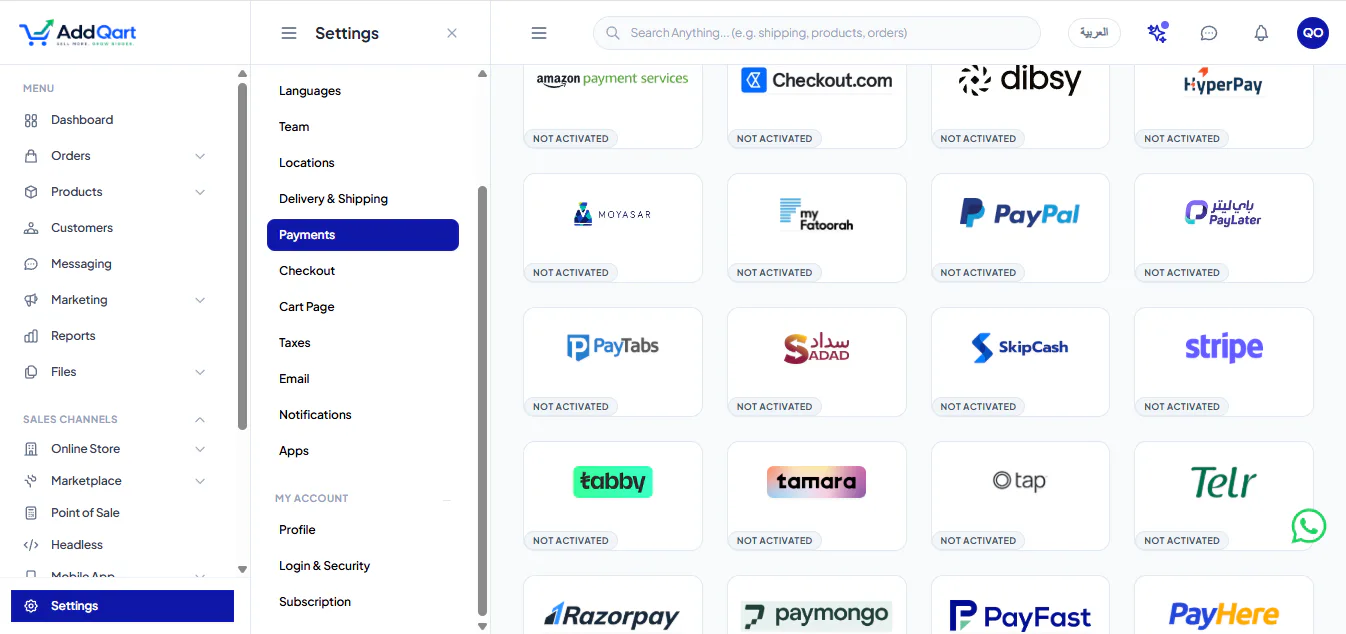
In your merchant sidebar, navigate to **Settings → Payments**. Locate **PayLater** in the gateway grid and click on it to open the configuration panel at `/settings/payments/paylater`.
### Step 2: Configure Your Credentials
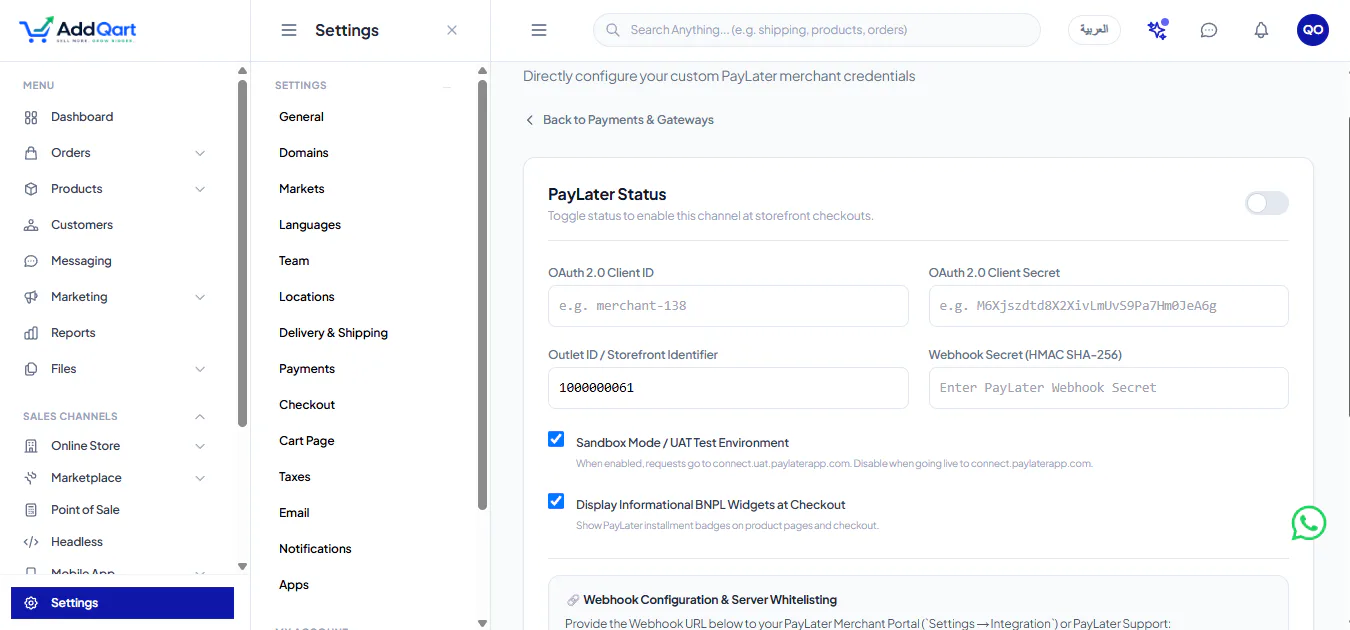
Enter the parameters provided by your PayLater account manager:
1. **OAuth 2.0 Client ID (`client_id`)**:
Input your assigned client identifier (e.g. `merchant-138`).
2. **OAuth 2.0 Client Secret (`client_secret`)**:
Paste your secret key used to generate bearer authentication tokens.
3. **Outlet ID / Storefront Identifier (`outlet_id`)**:
Your unique terminal or storefront identifier (e.g. `1000000061`).
4. **Webhook Secret (`webhook_secret`)**:
The HMAC SHA-256 secret key used by AddQart to cryptographically verify asynchronous payment callback payloads.
5. **Sandbox Mode / UAT Test Environment (`sandbox`)**:
- Check this box to route transactions to the test environment (`https://connect.uat.paylaterapp.com`).
- Uncheck this box when ready to accept real customer orders on production (`https://connect.paylaterapp.com`).
6. **Display Informational BNPL Widgets at Checkout (`show_widgets`)**:
Leave checked to automatically enable installment badges across your product pages and checkout.
### Step 3: Copy Your Webhook URL
In the PayLater settings panel, look for the **Webhook Configuration & Server Whitelisting** box.
- Click the **"Copy Webhook URL"** button to copy:
`https://api.addqart.com/api/webhooks/paylater`
- Provide this URL to your PayLater Merchant Portal under `Settings → Integration` or email it directly to your PayLater integration support team.
### Step 4: Whitelist the AddQart Server Domain
If your PayLater enterprise agreement requires origin firewall whitelisting, submit the AddQart backend domain to PayLater support:
```
api.addqart.com
```
### Step 5: Run the Live API Connection Test
Before enabling live transactions, click the **"Test API Connection"** button located directly inside the dashboard.
- The AddQart backend executes an immediate OAuth 2.0 handshake with PayLater's token exchange endpoint (`/oauth/token`).
- If your credentials are correct, you will instantly receive a confirmation banner:
> *"PayLater OAuth 2.0 handshake verified successfully!"*
- Click **"Save Configuration"** and toggle the gateway to **Active**. Your store is now ready to process PayLater orders!
---
## 6. Storefront Installment Widgets & Checkout UX Best Practices
Merchants often make the mistake of only displaying installment options on the final checkout page. By that point, price-sensitive shoppers have already abandoned their session.
To maximize revenue, AddQart includes native, automated merchandising widgets throughout the customer journey:
### 1. The Product Page Installment Badge
AddQart's built-in `` automatically computes 4-split payments dynamically client-side without slowing down page load:
```tsx
```
The badge features a modern purple-and-cyan brand badge displaying:
- **Top Label**: `PAY WITH PAYLATER`
- **Dynamic Price**: `Pay QAR 125.00 today` (for a QAR 500 product)
- **Bottom Tag**: `INTEREST-FREE`
### 2. The Cart Slide-Over Preview
Before shoppers reach checkout, the cart drawer previews their 4-split payment amount, reassuring them that their purchase fits comfortably within their monthly budget.
### 3. The Dedicated Checkout Tile
During checkout, PayLater appears alongside Credit Cards, NAPS, and Apple Pay as an intuitive radio tile labeled **"PayLater BNPL"**. Selecting PayLater smoothly redirects the customer to the secure web-checkout link (`/api/paylater/merchant-portal/v2/web-checkout/link`) and redirects back upon successful verification.
---
## 7. Security, Regulatory Compliance & Zero Merchant Default Risk
Offering flexible installments requires adherence to stringent banking and consumer credit protocols. AddQart and PayLater ensure enterprise-level compliance from day one:
### Cryptographic Webhook Security
Every transaction callback received from PayLater at `https://api.addqart.com/api/webhooks/paylater` is validated against your `webhook_secret` using an **HMAC SHA-256 signature check**. Tampered or forged requests are rejected at the edge before touching your database or order statuses.
### Zero Merchant Credit Risk
Retailers never take on debt or liability. If a consumer fails to pay their second, third, or fourth installment:
- The merchant retains 100% of the funds settled into their bank account.
- The merchant is **never debited or penalized**.
- PayLater's internal legal, underwriting, and collections division handles all consumer recovery operations.
### Data Privacy & PCI DSS
Customer credit card and banking details are captured inside PayLater's PCI-DSS Level 1 certified vault. No sensitive credit card numbers or banking passwords ever touch your AddQart storefront servers, ensuring complete compliance with regional data protection mandates.
---
## 8. Search-Intent FAQs: Everything Merchants Need to Know
### What is PayLater on AddQart?
PayLater is an integrated flexible payment solution that allows e-commerce shoppers to divide their total purchase into 4 equal, interest-free installments. The customer pays 25% today, while the merchant receives 100% upfront settlement into their bank account within 1-2 business days.
### Do merchants assume any risk if a customer defaults?
No. Merchants assume 0% default risk. PayLater fully underwrites and manages all installment collections. If a shopper delays or defaults on payment, the merchant retains 100% of their revenue without any chargebacks or clawbacks.
### What are the exact fields required in the AddQart Merchant Dashboard?
To configure PayLater under **Settings → Payments → PayLater**, you need:
1. **OAuth 2.0 Client ID** (`client_id`)
2. **OAuth 2.0 Client Secret** (`client_secret`)
3. **Outlet ID / Storefront Identifier** (`outlet_id`)
4. **Webhook Secret** (`webhook_secret`)
5. **Sandbox Mode Toggle** (`sandbox`)
6. **Display Widgets Toggle** (`show_widgets`)
### How do I verify that my PayLater credentials are functioning?
In your AddQart dashboard at `/settings/payments/paylater`, simply click the **"Test API Connection"** button. The engine performs an immediate live OAuth 2.0 handshake with PayLater's token endpoint and reports instant confirmation.
### What Webhook URL should I provide to PayLater support?
Provide the following webhook endpoint:
`https://api.addqart.com/api/webhooks/paylater`
You can copy this directly with the 1-click **"Copy Webhook URL"** button inside your AddQart dashboard.
### Does AddQart charge transaction fees on PayLater orders?
No. Unlike Shopify, which penalizes merchants with an extra 1.0% to 2.0% transaction tax when using third-party payment gateways, AddQart charges **strictly 0% platform transaction fees** on all PayLater orders across all subscription plans.
### Does PayLater charge customers interest or late fees?
PayLater provides 0% interest on its standard 4-split installments. Compliant consumers who pay on schedule incur zero interest and zero added fees.
### How does PayLater increase Average Order Value (AOV)?
By breaking down large purchases into 4 smaller, manageable sums, customers feel comfortable adding complementary accessories or upgrading to premium items, resulting in a documented **+35% to +48% increase in Average Order Value**.
---
## Frequently Asked Questions (FAQ)
### What is PayLater and how does it work on AddQart?
PayLater is a flexible deferred payment gateway integrated into AddQart. It lets consumers split their purchases into 4 equal, interest-free monthly installments. The shopper pays 25% today, while the merchant receives 100% upfront settlement into their bank account within 1-2 business days.
### Do merchants assume any risk if a customer fails to pay their installments?
No. Merchants assume zero credit or default risk. PayLater fully underwrites and manages all installment collections. If a shopper defaults, the merchant retains 100% of their settled revenue without any clawbacks or chargebacks.
### What fields are needed to activate PayLater in the AddQart dashboard?
In your dashboard at Settings → Payments → PayLater, you need: (1) OAuth 2.0 Client ID, (2) OAuth 2.0 Client Secret, (3) Outlet ID / Storefront Identifier, (4) Webhook Secret (HMAC SHA-256), (5) Sandbox Mode checkbox, and (6) Display Widgets checkbox.
### How do I test my live PayLater API credentials before launch?
Simply click the 'Test API Connection' button inside your AddQart PayLater settings page. The backend triggers an immediate OAuth 2.0 token handshake with PayLater's authentication endpoint and confirms whether your credentials are valid.
### What is the PayLater webhook URL for AddQart?
The webhook URL is: https://api.addqart.com/api/webhooks/paylater. You can copy it with a single click using the 'Copy Webhook URL' button inside your dashboard.
### Does AddQart charge transaction fees on PayLater orders?
No. AddQart charges strictly 0% platform transaction fees on all PayLater orders across all subscription tiers, saving merchants 1% to 2% compared to Shopify.
### Does PayLater charge customers interest or hidden fees?
No. PayLater offers 0% interest on standard 4-split installments. Compliant customers who pay on schedule pay only the exact retail price of their items.
### How does PayLater boost conversions and Average Order Value (AOV)?
By breaking total checkout prices into 4 affordable installments, PayLater eliminates month-end purchasing hesitation, boosting checkout conversions by +35% and Average Order Value by +45% to +48%.
---
*Published by AddQart Technologies — 0% Transaction Fees, Native Qatar NAPS, Saudi MADA, and Unified Cloud POS.*